Wedding Budget Planner & Expense Tracker
Plan your dream wedding without the financial stress. Our Free Wedding Budget Template gives you a complete, organized framework to track estimated costs, monitor real-time spending, manage vendor payment statuses, and prioritize expenses so you stay on budget from "Yes" to "I Do."
-
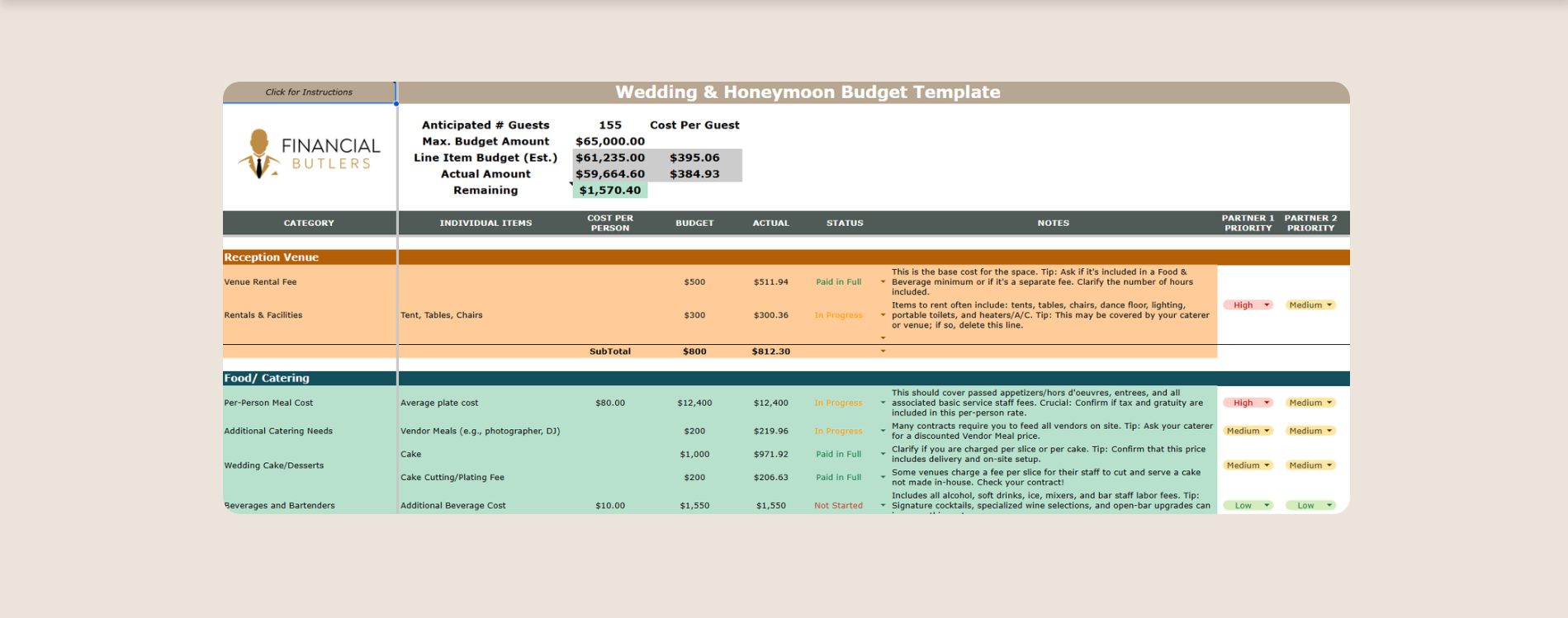
High-Level Dashboard & Summary Stats: Instantly track key metrics at the top of your sheet, including total guest count, maximum target budget, total estimated budget, total actual spending, and average cost per guest.
Comprehensive Spending Categories: Pre-organized sections covering every phase of your wedding and honeymoon:
Attire & Beauty: Gown, suit/tux rentals, alterations, accessories, hair, makeup, and pre-wedding pampering treatments.
Music & Entertainment: Ceremony musicians, cocktail hour music, and reception DJ/band.
Venue & Rentals: Reception venue rental fees, tents, tables, chairs, lighting, and decor.
Catering & Desserts: Per-person meal costs, vendor meals, bar/beverage fees, and wedding cake/desserts.
Photography & Videography: Full event coverage, engagement shoots, and photo albums.
Flowers & Decor: Bouquets, centerpieces, boutonnieres, ceremony arches, and floral installations.
Stationery & Postage: Save-the-dates, invitations, day-of signage, ceremony programs, guest books, and postage.
Honeymoon: Hotel accommodations, flights, ground transportation, and activity/spending money.
Planner & Contingency Buffer: Professional planning fees, website hosting, and an essential buffer for unexpected costs and vendor tips.
Payment & Status Tracker: Monitor whether each item is In Progress, Paid in Full, or N/A.
Flexibility & Value Priority Scoring: Built-in indicators for Flexibility Level and Value/Impact Level to help you decide where to save and where to splurge.
-
Follow these simple steps to customize and manage your wedding budget:
Step 1: Set Your High-Level Targets
Navigate to the top summary section and enter your core parameters:
Anticipated Guest Count: Input your estimated number of guests.
Max Budget Amount: Enter the total maximum dollar amount you are willing or able to spend.
Step 2: Estimate Your Line Items
Go through the pre-populated categories and input your Estimated Budget Amount for each line item.
Use the embedded Pro Tips & Guidance notes in the spreadsheet to help guide your estimations (e.g., accounting for alteration fees, vendor meals, or postage taxes).
Tip: Keep an eye on the top summary row to ensure your total line-item estimates align with your Max Budget Amount.
Step 3: Track Actual Spending & Payment Status
As you hire vendors, place deposits, and make purchases:
Enter the actual cost into the Actual Amount column.
Update the Payment Status column to In Progress or Paid in Full. If a category doesn't apply to your wedding, mark it as N/A or set the amount to $0.
Step 4: Prioritize & Cut Costs Using Priority Scoring
If your estimated costs exceed your maximum budget:
Review the Flexibility Level (Low, Medium, High) and Value Level (Low, Medium, High) columns.
Identify high-cost items that have High Flexibility or Low Value to find easy areas to scale back without sacrificing your vision.